

फ़ील्ड टीम के लिए अटेंडेंस और पेरोल: GPS और सेल्फ़ी से पंच-इन, छुट्टी, ओवरटाइम, जाँचा हुआ पे रन, Form V पेस्लिप और आपके CA के लिए वर्कशीट, एक ही ऐप में।
If half your team works away from the office, attendance is the first thing that slips. Someone signs the register for a friend, a technician says they reached the customer at ten, and at month end the owner works out salaries on a calculator from WhatsApp messages and memory. Then the arguments start.
An attendance and payroll app fixes this only if it covers the whole month, from the first punch-in to the payslip and the files your CA needs. This post walks that month in the order you would actually use it: switch it on, set the rules once, add people and salaries, then the staff's day, requests, the register, the pay run and the payslips. Every screen is from Raymitra, the AI-powered CRM + ERP we build, filled with a sample company's data. A step-by-step video of the same setup is coming to our YouTube channel.
1. Switch it on
Attendance and payroll is a module you switch on in Settings. Until you do, nobody is asked to punch in, so you can set everything up first and go live on the day you choose.
2. Set the rules once
Most attendance disputes come from rules that were never written down. Write them once:
- Places. Add each office, warehouse or work location with a radius around it. A punch from outside every place is flagged for the manager, or refused, depending on the rule you pick. Work locations on a staff member's day plan count by themselves on those days. A laptop can punch only from your office network.
- Selfie at punch. Ask for a photo with every punch, so the person punching is the person on the register.
- Weekly offs and holidays. Set the weekly off and the year's holiday list once, and the register marks them for everyone.
- Shifts. Start and end times per shift, with the minutes after which a day becomes a half day and a late mark is counted.
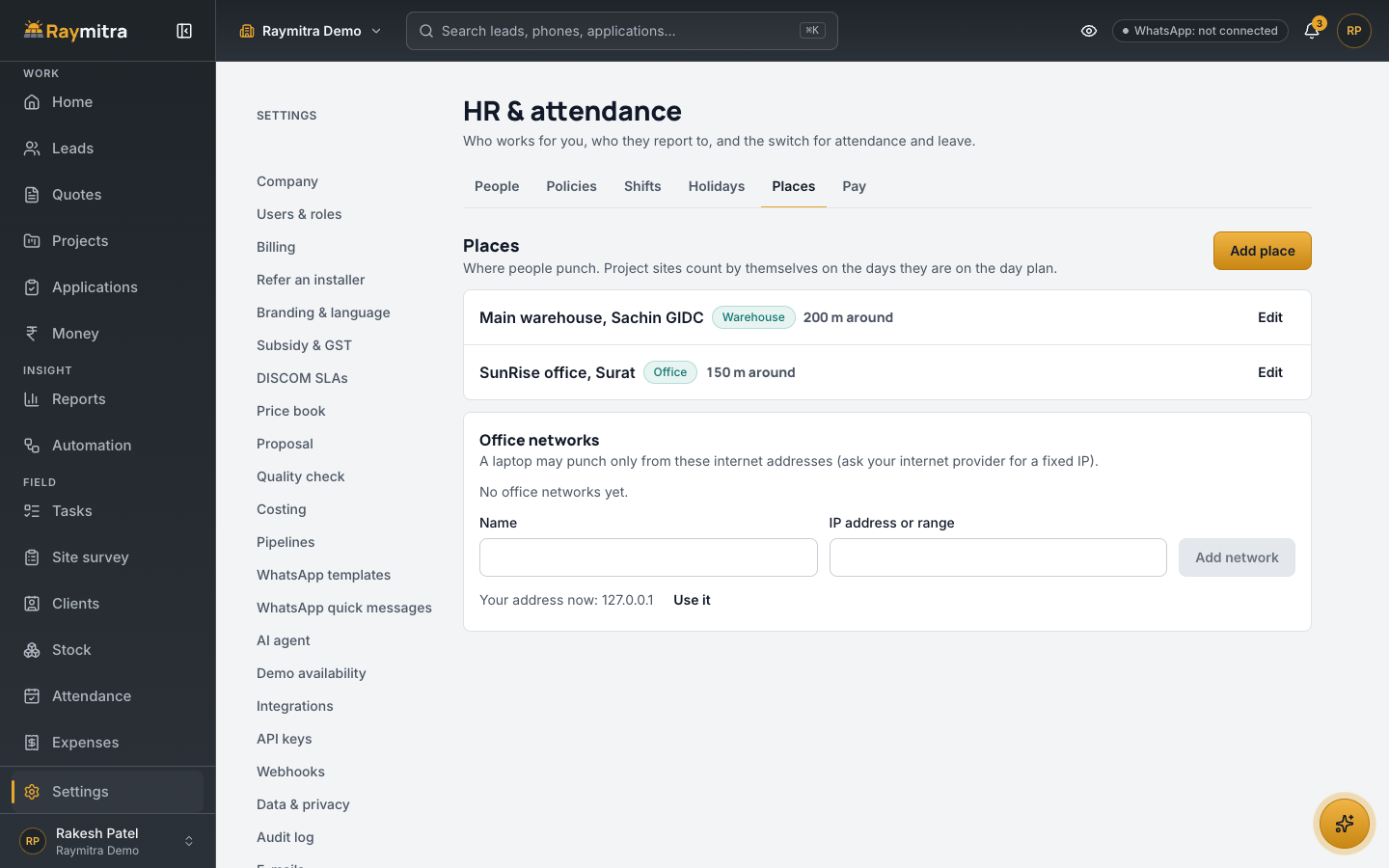
3. Add your people
Add each person with their manager. Staff without a smartphone are not left out: mark them "no app" and their manager marks their attendance.
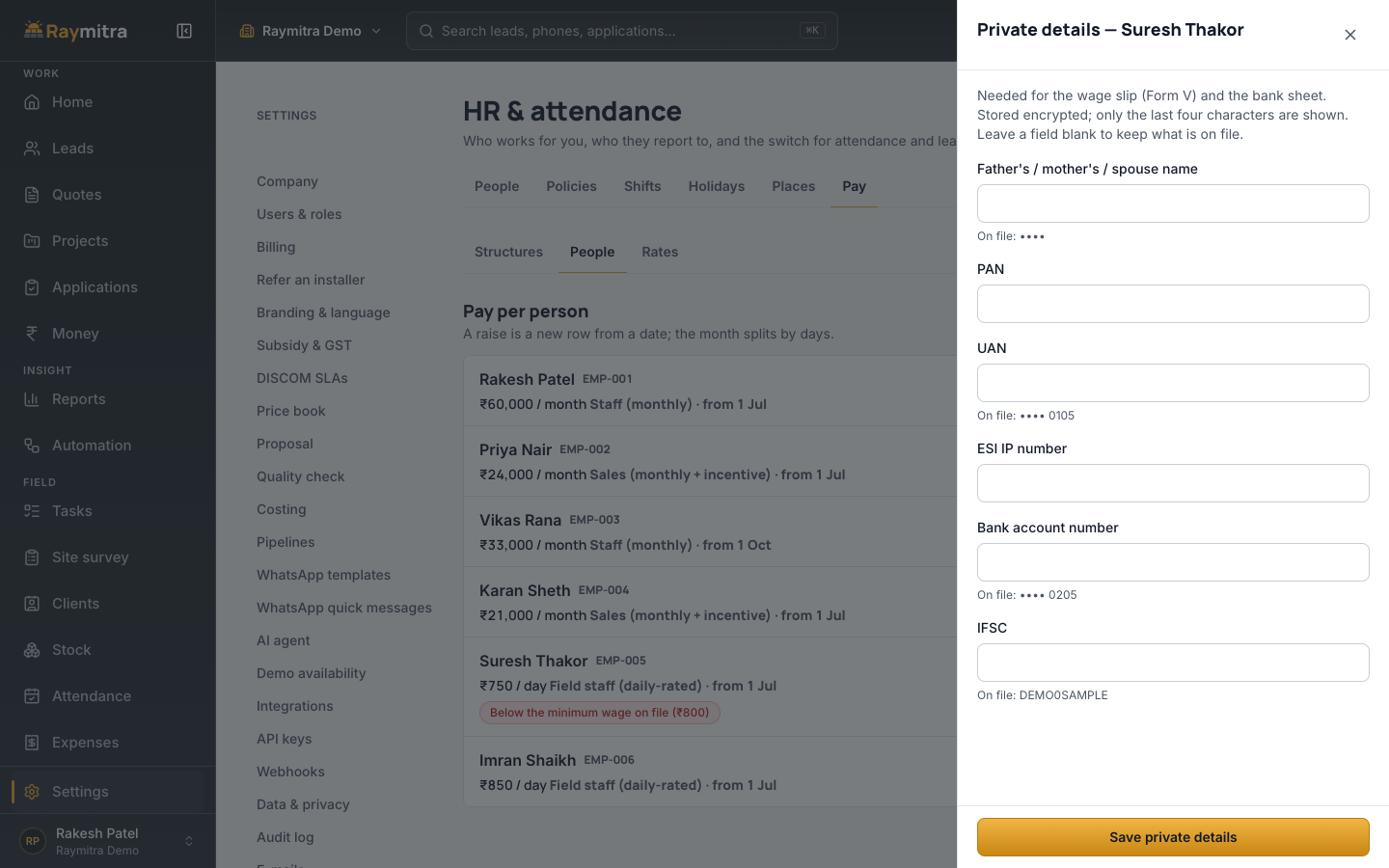
The details a payslip and a bank sheet need, PAN, UAN and bank account, sit in a separate private sheet. They are stored encrypted, and the screen shows only the last four characters after saving.
4. Salary structures
Pick a structure per person: daily for day-rated staff, monthly for salaried staff, or monthly plus incentive for sales. A raise is a new salary from a date, and that month's pay splits by days at the old and new rate. Choose who is covered by PF and ESI.
If a daily or monthly rate is below the minimum wage on file, the app flags it next to that person's pay.
5. The staff's day
Staff punch in and out from the phone app with GPS and a selfie. If the phone is offline, the punch is saved and sent when the network returns, and it is never counted twice.
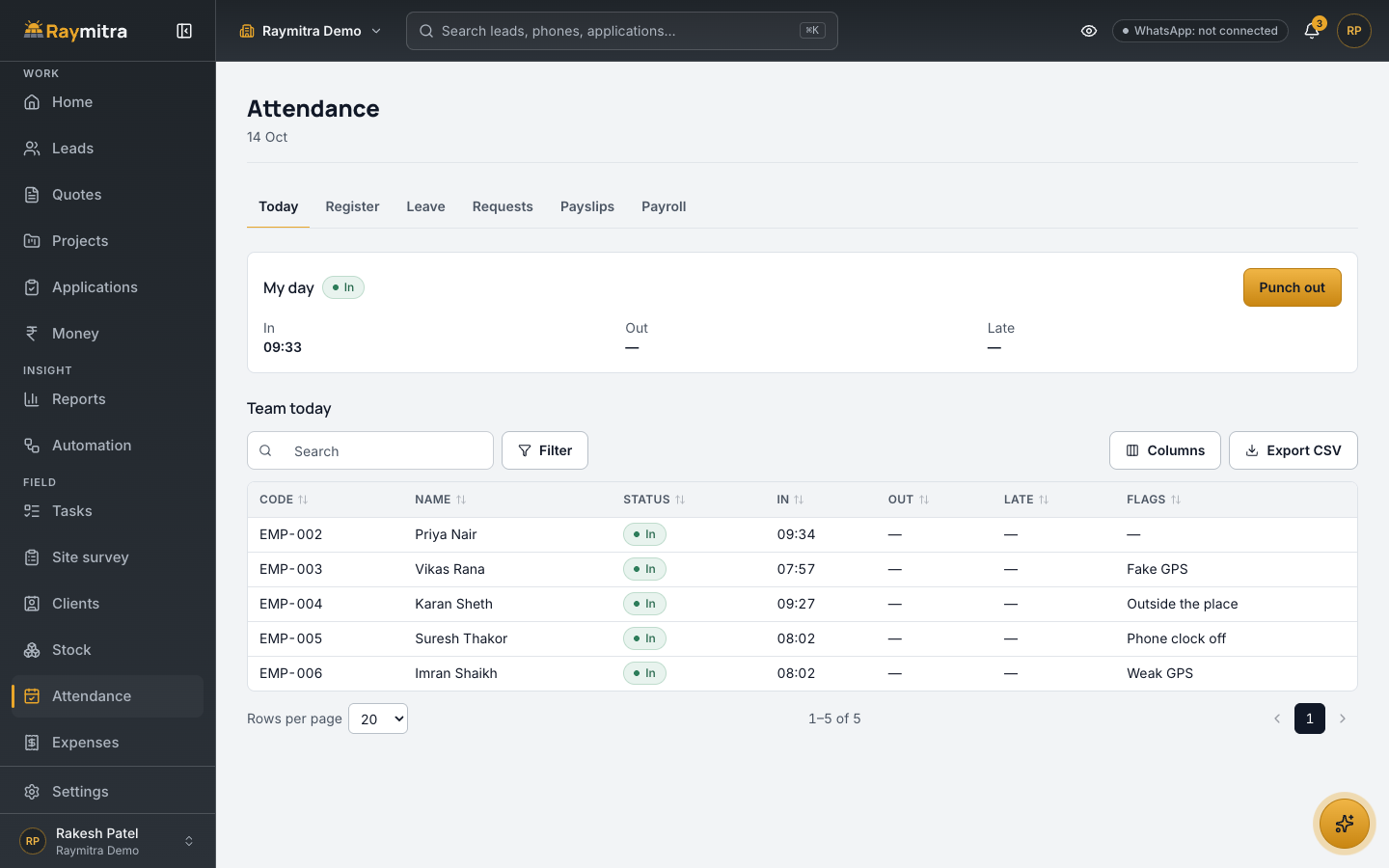
Each punch is checked against your rules, and anything odd is flagged for the manager instead of being silently accepted or refused:
- outside every place;
- weak GPS;
- fake GPS;
- a phone clock that does not match.
These flags are rules, not guesswork, so the manager sees exactly why a punch was flagged.
6. Leave, day fixes and overtime
Staff ask for leave, including half days, from the app. A forgotten punch becomes a request to fix that day, and extra hours become an overtime request. Each goes to the person's manager. If the manager has left, the request comes to you, marked as needing you.
7. Today and the register
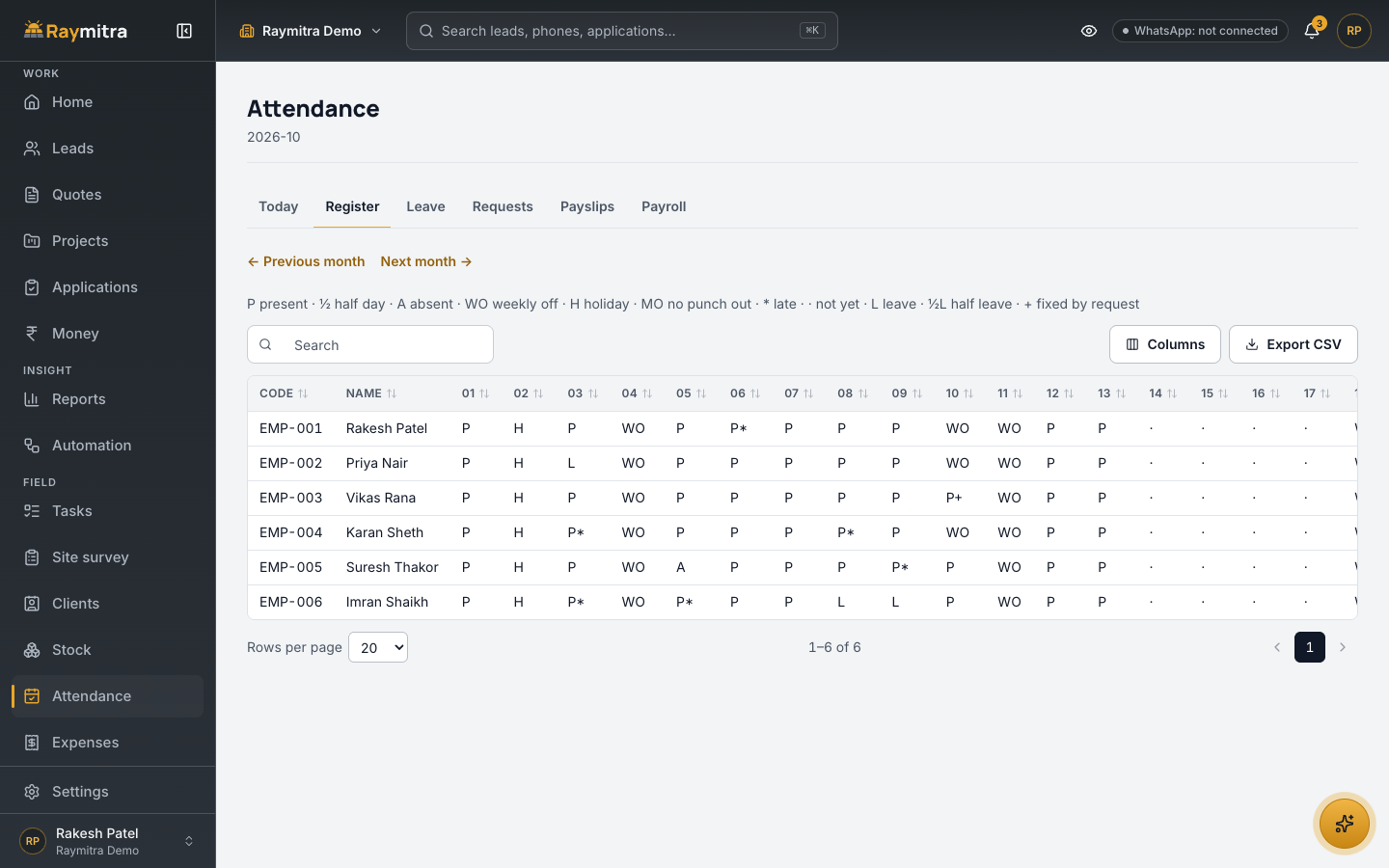
The Today board shows each person's punch-in and punch-out, late marks and flags for the day. The register builds itself for the month, with leave, holidays, weekly offs and approved fixes laid over each day, and totals per person.
8. The pay run, with checks before the lock
At month end, compute the pay run from the register. Add one-off adjustments one at a time or from a CSV. Before you can lock the month, the app lists what needs a look, for example days that are not final yet, leave or overtime still waiting for a decision, or a person whose net pay moved a lot from last month. Some checks block the lock until fixed; the rest ask you to check.
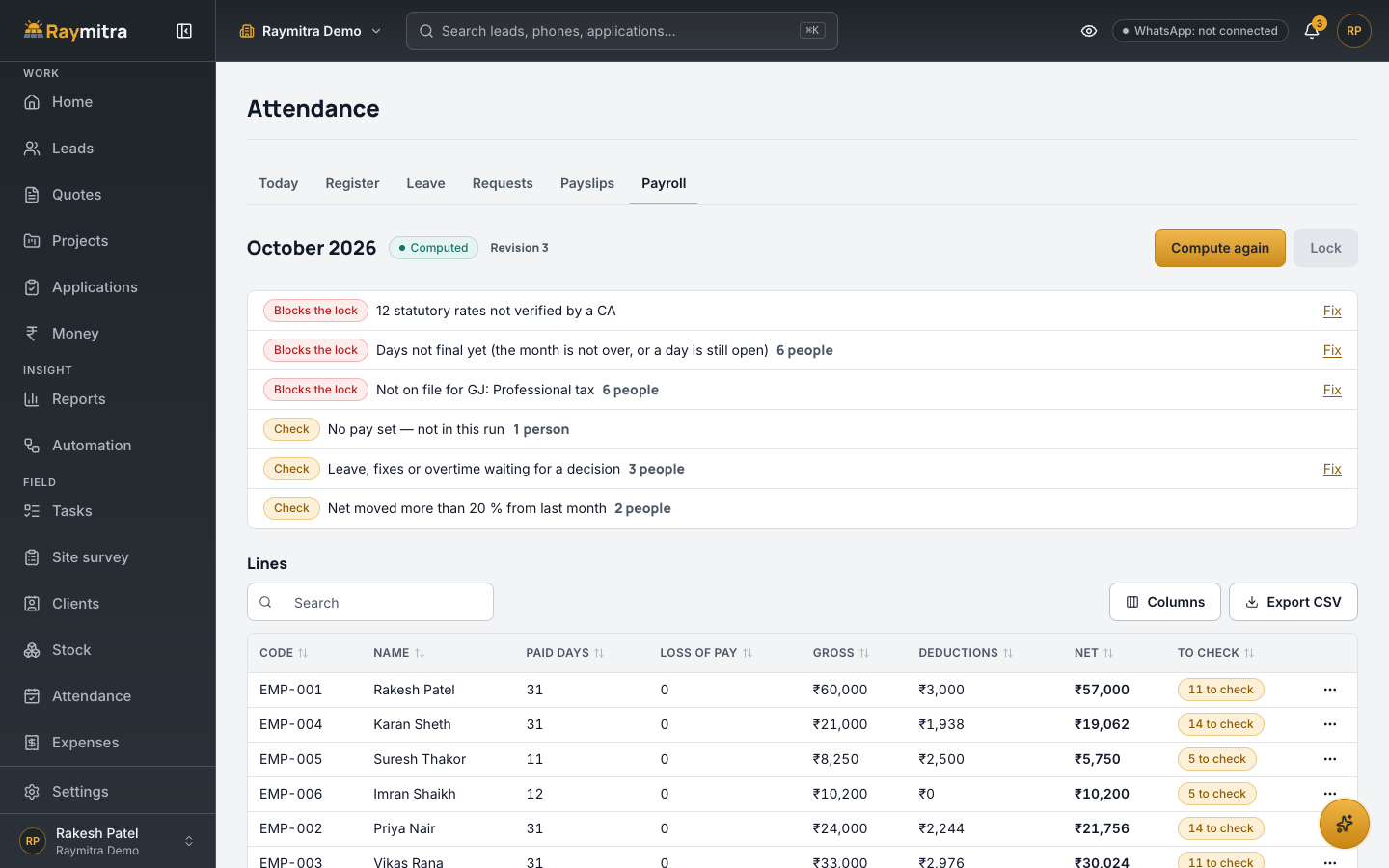
After the lock, mark each person paid by bank, cash or UPI, and download a bank sheet for the transfers. If a mistake turns up after the lock, an amendment pays only the difference; the locked month is not rewritten.
9. Run a shadow month first
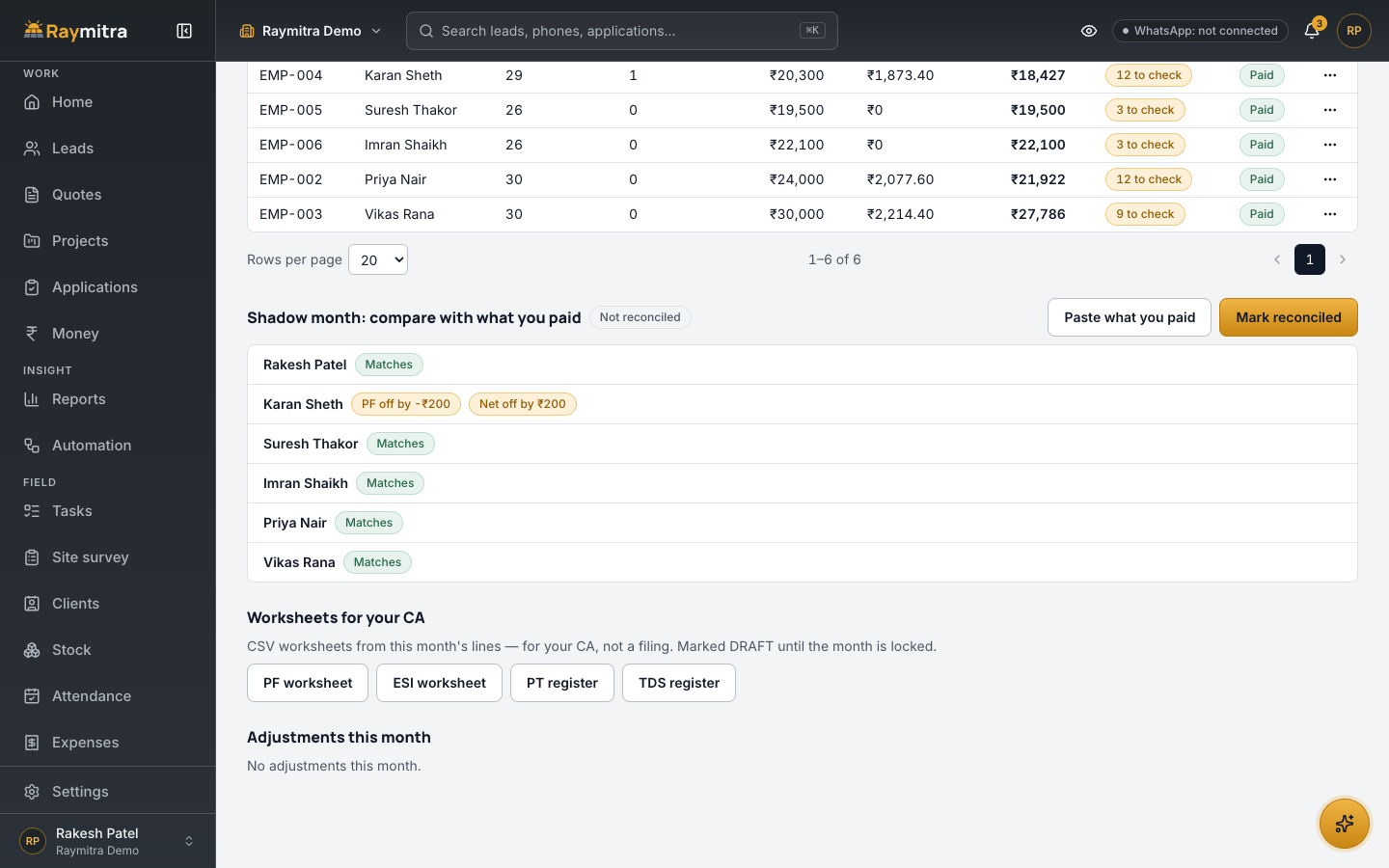
Before you trust any payroll app with real salaries, run one month in parallel. Raymitra's shadow month lets you paste what you actually paid last month and compares it line by line with what the app computed. Where they differ, you see by how much, and you fix the rule or the data before going live.
10. Payslips and worksheets for your CA
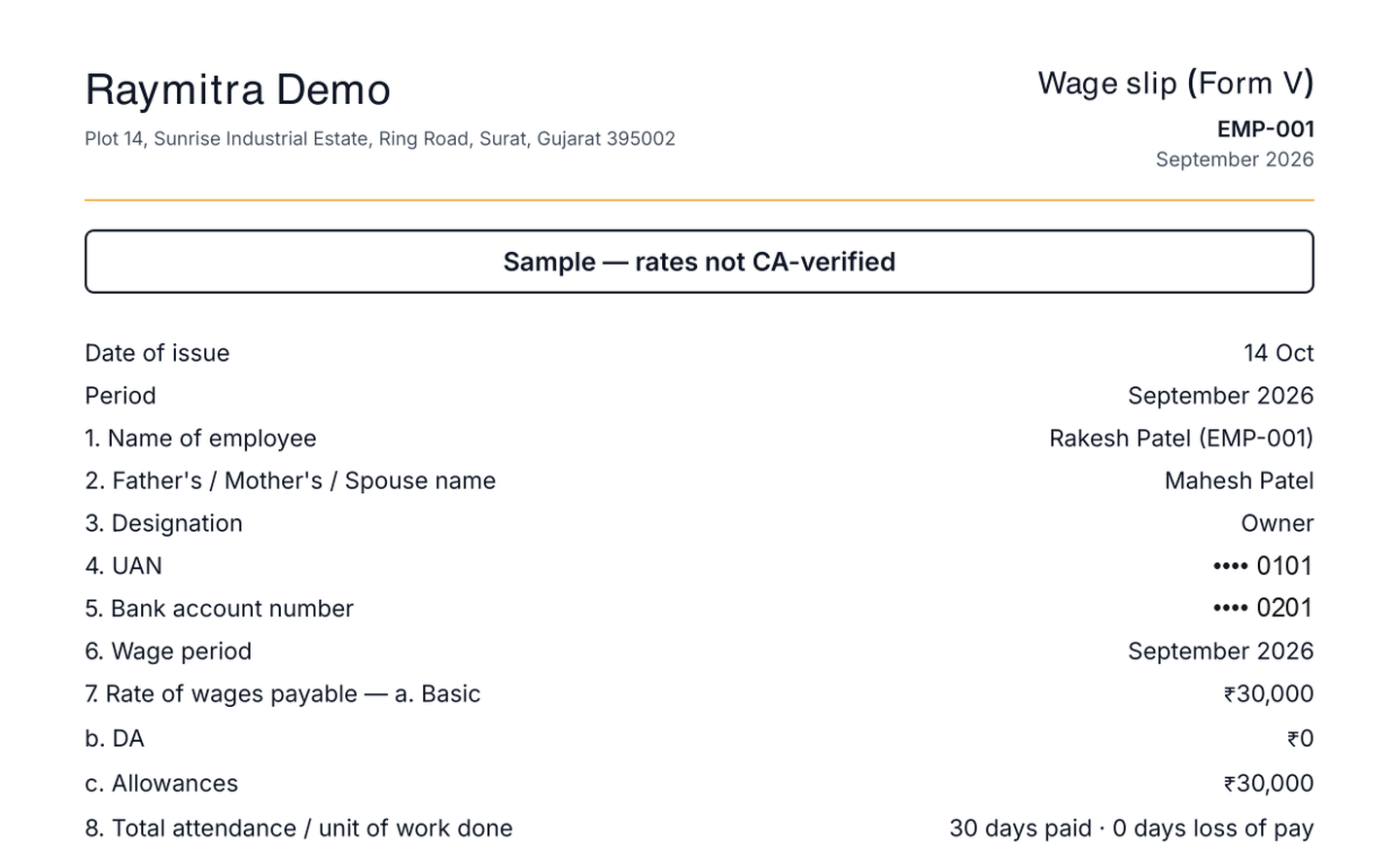
Each locked month gives every person a payslip in the Form V wage-slip format, as a PDF in English, Hindi or Gujarati, and staff see their own payslips in the app.
For your CA, the month produces worksheets for PF, ESI, professional tax and TDS as CSV files. They are worksheets to prepare the returns from, not a filing: your CA still files. Until your CA has checked the statutory rates, the payslips say they are a sample.
11. Expenses and advances
Field staff spend money on the job. They add an expense with a photo of the bill, and the manager approves it. An advance against salary is recovered in instalments from the following pay runs, so nobody keeps a separate notebook for it.
If you run a solar installation business, the same app also runs the rest of it, from leads and quotes to stock and service. The app itself runs in Hindi · Marathi · Gujarati · English + more on request.
Test any attendance app before you buy: 10 checks
Use your own team for a week, not the vendor's demo company:
- Punch in from outside every place and see whether it is flagged or refused, as you chose.
- Turn mobile data off, punch in, turn it back on, and check the punch is counted once.
- Change the phone's clock and punch in. The manager should see a flag.
- Add a staff member with no smartphone and mark their day as the manager.
- Give someone a raise from the middle of a month and check the split.
- Enter a rate below the minimum wage and see whether the app warns you.
- Ask for a half day and an overtime request, then approve both from the manager's phone.
- Run a month and try to lock it with an open request. It should stop you.
- Paste last month's real salaries and compare them line by line.
- Download a payslip and the PF and ESI worksheets, and show them to your CA before you go live.
Frequently asked questions
Does every staff member need a smartphone?
No. Staff without a phone are marked "no app", and their manager marks their attendance.
Does the app file PF, ESI or TDS?
No. It gives your CA worksheets for PF, ESI, professional tax and TDS from the month's lines. Your CA files.
Which businesses is it for?
Any business with office or field staff.
Try it
WhatsApp us — our AI replies in seconds, book a demo, or start the free trial, no card needed, from the button below.
Updated 11 Nov 2026: plans and prices are on the pricing page.